





Delivering enterprise integration assets can be time-consuming. For example, a design specification might take anywhere from 2 hours to 2 days. But now, with AI assistants it can often be completed in less than an hour. The same applies to creating the structure and framework for a new API, which normally takes hours but can now be accelerated with AI support.
AI-assisted development is quickly becoming the norm, and as Architects, Developers, and Integrators, we need to embrace these tools to work smarter and grow. In this blog, I’ll walk you through how to set up MuleSoft Vibes in Visual Studio Code so you can start taking advantage of these efficiencies.
In this blog I will cover:
- Setting up your Anypoint Platform to allow for MuleSoft Vibes interaction
- Setting Up your Salesforce instance to Enable MuleSoft and Einstein
- Installing MuleSoft Vibes
- Some useful set up tips
What is MuleSoft Vibes, and why does it matter?
MuleSoft has recently rebranded its MuleSoft Dev Agent as MuleSoft Vibes. With this update, they have made it easy to setup and use MuleSoft Vibes for your MuleSoft API design and development.
Using MuleSoft Vibes allows you to access the power of AI development with MuleSoft without the cost of a third-party AI agent subscription. You can use your existing Anypoint Platform and either an existing Salesforce Platform or sign up for a free Developer Platform.
For more information on MuleSoft Vibes see: https://www.mulesoft.com/platform/api/anypoint-code-builder/announcing-mulesoft-vibes
How to set up MuleSoft Vibes
Setup Salesforce Platform
The first thing to do is set up your Salesforce Platform. If you have an existing Salesforce Platform.
If you don’t have a Salesforce Platform then sign up for a free Developer Platform.
From your Salesforce Platform Setup:
Step 1:
- Go to MuleSoft Anypoint Platform Setup
- Enable Agentforce in Anypoint Platform and link to your Anypoint Platform Org.
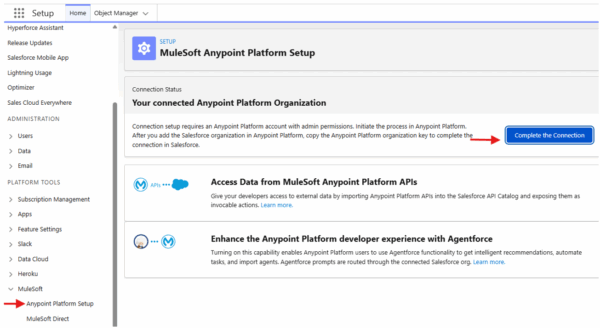
Image: Step 1a – Go to MuleSoft Anypoint Platform Setup, enable Agentforce
Then you will have:
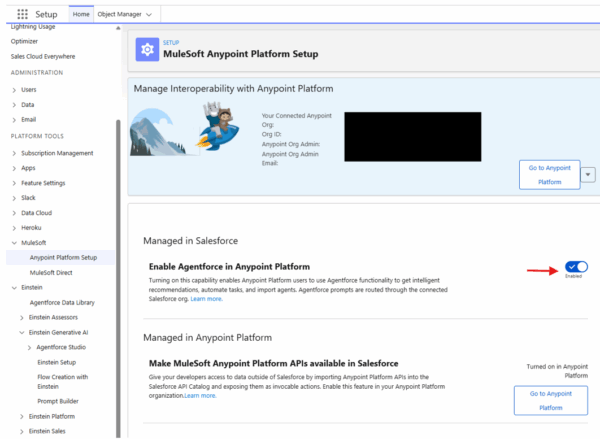
Image: Step 1b – Enable Agentforce in Anypoint Platform
Step 2:
- Go to Einstein Setup
- Turn on Einstein
- Turn on Prompt Builder Settings
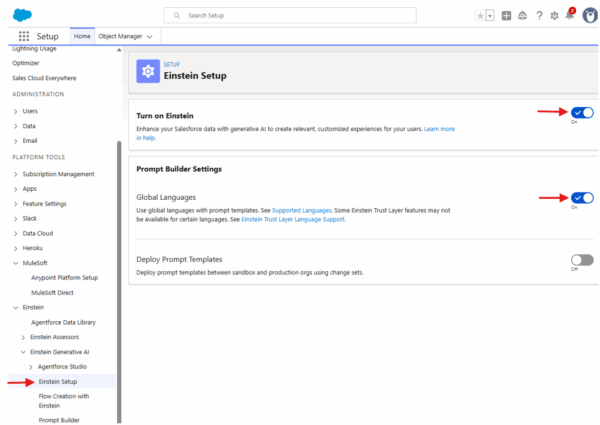
Image: Step 2 – Go to Einstein Setup, turn on Einstein, turn on Prompt Builder Setup
Set up your Anypoint Platform
As part of the Salesforce Platform setup you will have already had to link your Anypoint Platform to your Salesforce Platform, you can see this in the image below:
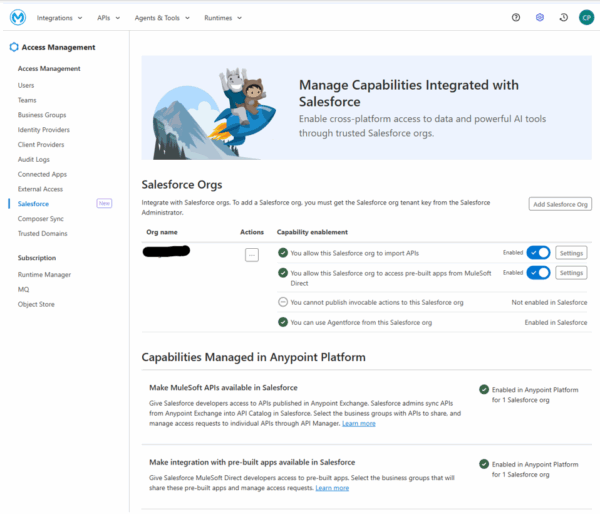
Image: Setup your Anypoint Platform
If you ever change your Salesforce Org or have more than one you will also have to make sure you have set the Agentforce enabled Org you want to use in the ‘Enhance Anypoint Platform with Agentforce’ setting (like below).
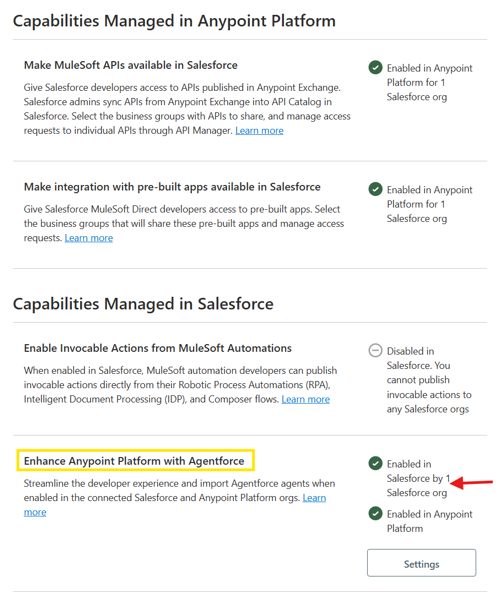
Image: Enable Enhance Anypoint Platform with Agentforce
Now Update your Teams permission for the user you are going want to use MuleSoft Vibes
- Set these Anypoint Exchange permissions so that users can download and publish assets:
- Viewer
- Creator
- Set these Runtime Manager permissions to enable services related to CloudHub and CloudHub 2.0, such as deploying applications:
- Read applications
- Create applications
- Delete applications
- Set these Anypoint Code Builder permissions so the user can use MuleSoft Vibes:
- Mule Developer Generative AI User
- Anypoint Code Builder Developer
Set up VSCode (Visual Studio Code)
- If you haven’t already, you will need to Install VS Code
- Install Anypoint Extension Pack in VS Code extension
- note the Prerequisites (bottom right of image below)
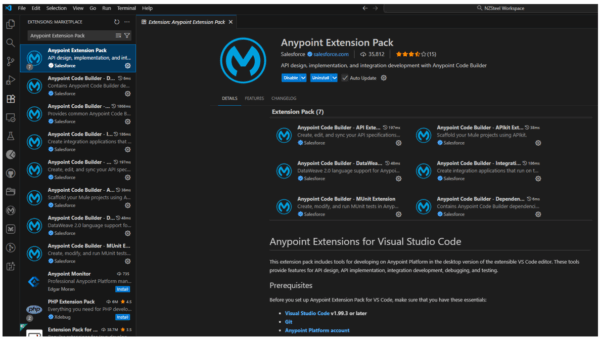
Image: Setup VSCode, note Prerequisites
Once it is installed, you will have this (see image below):
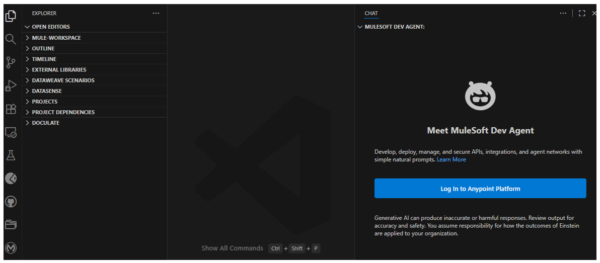
Image: After Installing
Log into your Anypoint platform, you should now be ready to start.
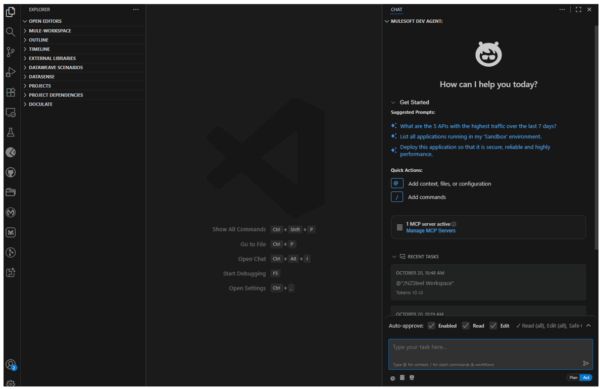
Image: After Logging in to your Anypoint Platform
First time use: Create an API design spec as a test
Let’s create a simple API design spec as a test.
Step 1: Enter Prompt
Create a MuleSoft API OA 3 Design spec.
– API title = First Vibes Api
– use OAuth 2.0 for security
– Requests
– Get /health
– Post /events/visitor
– input example
visitor:
messageId: “msg-12345-67890”
timestamp: “2024-01-15T10:30:00Z”
eventType: “visitor.created”
source: “Front Door”
correlationId: “corr-abc123”
data:
visitorType: “Friend”
total: 2
visitors:
– name: “John Smith”
– age: 45
– sex: “male”
– year-known: 5
– Define components in separate subfolders
Step 2: upload API spec to Anypoint platform
This will need to be a manual task as the AI doesn’t have the ability to upload a design into Anypoint Design Center.
- Zip up the Api specification folder
- Go to Anypoint Design Center and Import the API Design
- Publish the API design to Anypoint Exchange
Results
Here is the result (video below):
Here is the result after uploading to Anypoint Exchange:
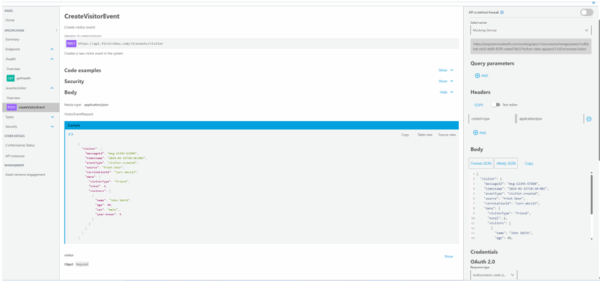
Image: Result after uploading to Anypoint Exchange
Closing
In just a few minutes we are now able to produce API design documentation that would take hours manually. We can then turn that Design into an API in minutes also. AI development is by no means perfect and isn’t going replace us human developers any time soon. We always need to review and refine the output, but it is definitely a huge help. With the help of AI, MuleSoft development will become quicker and more cost effective for MuleSoft users.
This is just the start, it will get better from here.
I hope from this quick guide you have been able to see the potential of MuleSoft Vibes and AI ‘assisted’ development. By adopting this new technology and incorporating it into our day-to-day development processes, companies like Adaptiv Integration can help to implement your business integration needs quicker and more cost effectively than ever before.
Time to embrace the new face of integration design and development, and keep an eye out for future blogs on using MuleSoft Vibes— there is so much more to investigate.